Jumphost & Secure Proxy Access
This guide explains how to configure the monitoring server as a Gateway (Jumphost) to allow secure access to internal client nodes from an external network.
SSH ProxyJump Topology
Before performing these tasks, ensure you are operating from the pandu-hakam home directory to avoid permission issues:
switch to pandu-hakam:
sudo -i -u pandu-hakam
1. Key Distribution
For passwordless access, keys must be authorized:
ssh-copy-id -i ~/.ssh/id_ed25519.pub [email protected]
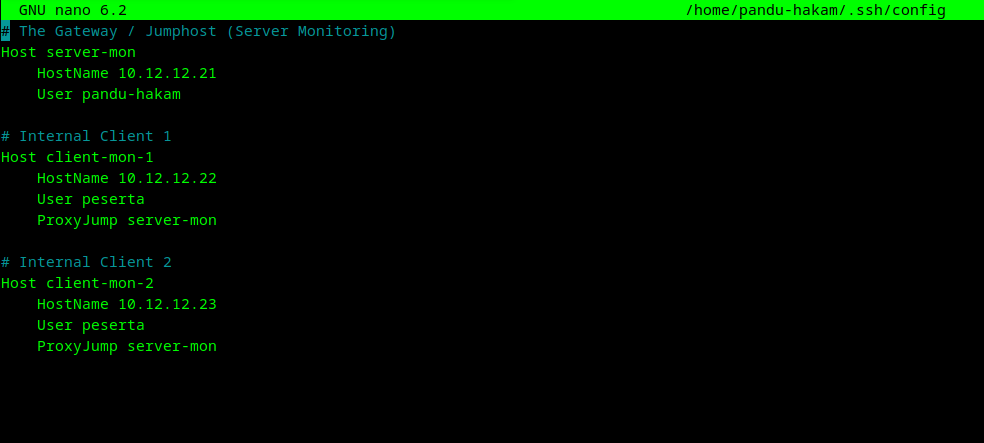
2. External Access Configuration (SSH Config)
To avoid typing long commands, define the relationship in your local ~/.ssh/config file:
3. Verification & Usage
A. Manual Connection (External)
Before setting up the config file, you can connect using the explicit jump flag:
ssh -J [email protected]:5050 [email protected]
Even though the connection passes through the Jumphost, the authentication is between your local machine and the destination node. This is why the destination node must have your local machine's public key.
B. Internal Connection (from Monitoring Server)
If you are already logged into the Monitoring Server, connect directly: