Automated File Retrieval (Cronjob)
Configure a cronjob to download a sample text file every 30 minutes, ensuring the local copy is overwritten without creating duplicates:
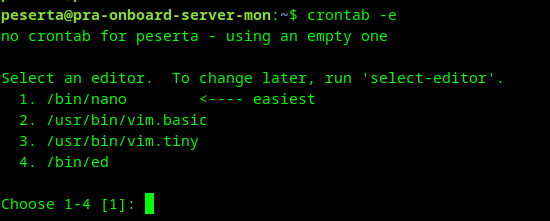
edit crontab:
crontab -e
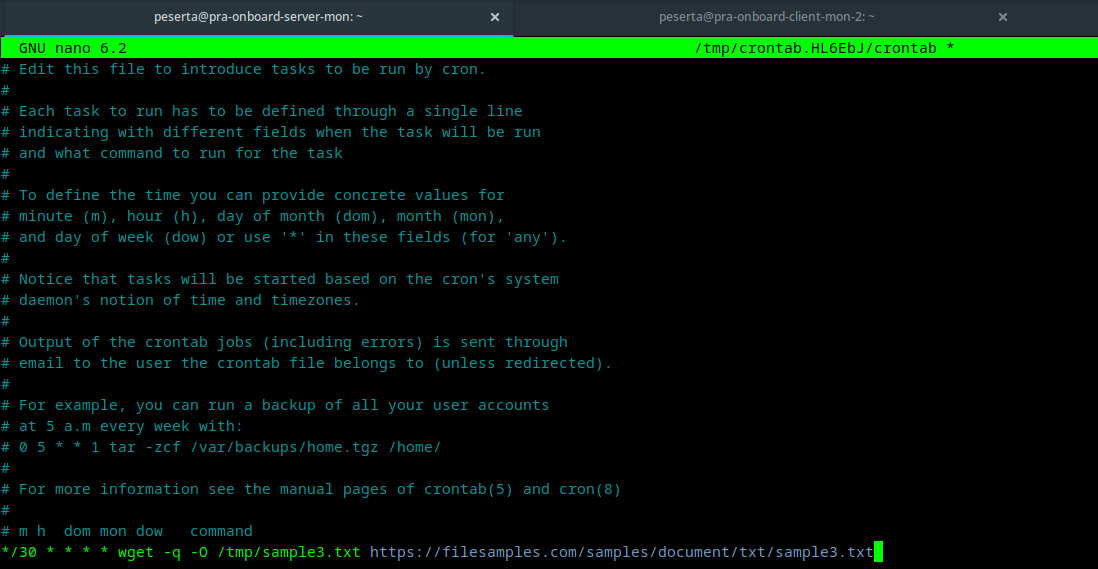
append cron task:
*/30 * * * * wget -q -O /tmp/sample3.txt https://filesamples.com/samples/document/txt/sample3.txt
tip
Using the -O flag with wget ensures the file is saved to a specific filename, effectively replacing the previous version and preventing duplicate files like sample3.txt.1.
How to Save & Exit (Nano)
After appending the cron task, follow these steps to save your changes and exit the editor:
- Press
Ctrl + X(Exit). - Press
Y(Yes) to confirm saving the modified buffer. - Press
Enterto finalize the filename and return to the terminal.
Cron Syntax Reference
A cron expression consists of five fields representing the time and frequency of a task:
* * * * *
│ │ │ │ │
│ │ │ │ └── Day of week (0 - 6) (Sunday to Saturday)
│ │ │ └──── Month (1 - 12)
│ │ └────── Day of month (1 - 31)
│ └──────── Hour (0 - 23)
└────────── Minute (0 - 59)
Field Values & Operators
| Operator | Description | Example |
|---|---|---|
* | Any value: Matches all possible values for that field. | * * * * * (Every minute) |
, | Value list separator: Specific points in time. | 15,45 * * * * (At minute 15 and 45) |
- | Range of values: Continuous range. | 0 9-17 * * * (Every hour from 9 AM to 5 PM) |
/ | Step values: Incremental jumps. | */15 * * * * (Every 15 minutes) |
Common Examples
0 0 * * *: Run daily at midnight.0 12 * * 1: Run every Monday at 12:00 PM.*/30 * * * *: Run every 30 minutes (as used in the example above).
info
For complex schedules, you can use Crontab.guru, a helpful visual editor and generator for cron schedules.